Ransomware-Proof Backups: Immutable Backup Architecture
Learn how immutable backups can protect cloud infrastructure from ransomware. Explore backup architecture, S3 Object Lock, retention policies, isolated backup accounts, recovery testing, and practical AWS security controls.
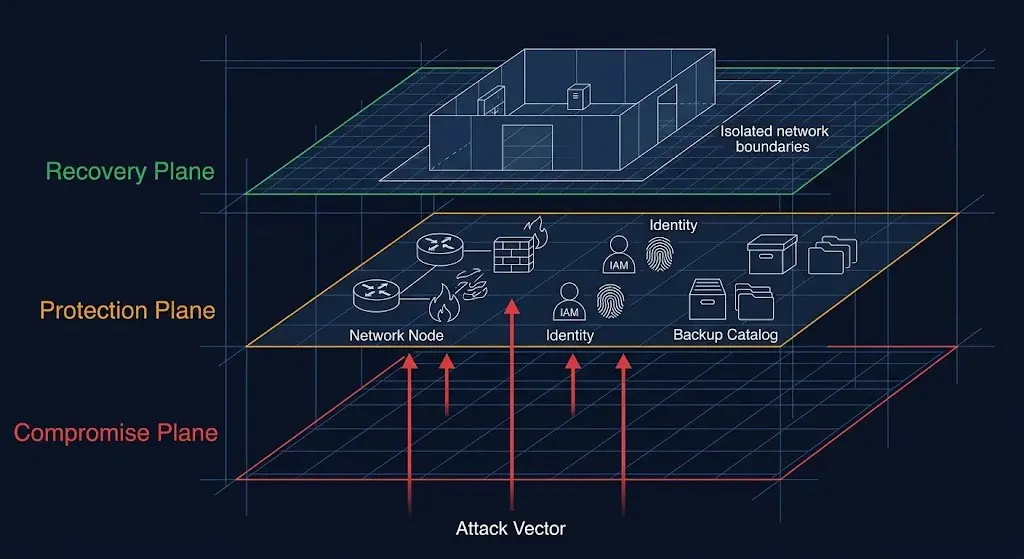
Ransomware is not only a production-system problem. Modern attacks can also target the backups that organizations depend on for recovery.
If attackers gain sufficient privileges, they may attempt to delete backup snapshots, encrypt backup data, compromise backup servers, or modify retention policies before deploying ransomware against production systems.
This is why modern disaster recovery strategies increasingly use immutable backups. An immutable backup is protected from modification or deletion for a defined retention period, helping ensure that a clean recovery point remains available even if production infrastructure is compromised.
In this guide, we will explore how to design an immutable backup architecture using isolation, access controls, retention policies, monitoring and regular recovery testing.
What Is an Immutable Backup?
An immutable backup is a backup copy that cannot be modified or deleted during a defined protection period.
The key idea is simple:
Production Data
      |
      v
Backup Process
      |
      v
Immutable Backup
      |
      |  Cannot be modified
      |  Cannot be deleted
      v
Recovery Point
Even if an attacker compromises a production server or obtains administrative credentials, the immutable copy should remain protected according to the controls and retention policy configured for the backup environment.
Why Traditional Backups May Not Be Enough
A traditional backup system may have the following architecture:
Production Server
      |
      v
Backup Server
      |
      v
Backup Storage
If the backup infrastructure uses the same credentials, network access and administrative domain as production, a compromise of the production environment may also expose the backups.
An attacker who obtains sufficient privileges could potentially:
- Delete backup files.
- Delete snapshots.
- Modify backup retention.
- Disable backup jobs.
- Compromise backup servers.
- Encrypt backup repositories.
- Steal backup data.
Therefore, backup security needs to be treated as part of the overall security architecture rather than as a simple scheduled copy operation.
Immutable Backup Architecture
A stronger architecture separates production infrastructure from the backup environment.
                 PRODUCTION ACCOUNT
                       |
                       v
                Production Data
                       |
                       v
                 Backup Service
                       |
              Encrypted Transfer
                       |
                       v
              BACKUP ACCOUNT
                       |
                       v
             Immutable Storage
                       |
             +---------+---------+
             |                   |
             v                   v
        Backup Copies       Backup Metadata
             |
             v
        Recovery Process
The important security principles are isolation, immutability, encryption, least privilege and independent recovery access.
1. Use a Separate Backup Account
One of the strongest architectural improvements is separating backup infrastructure from production infrastructure.
For organizations using AWS Organizations, a dedicated backup account can be used to store protected recovery copies.
AWS Organization
       |
       +--- Production Account
       |
       +--- Development Account
       |
       +--- Security Account
       |
       +--- Backup Account
                 |
                 +--- Immutable Backups
                 +--- Backup Vaults
                 +--- Recovery Resources
The backup account should have tightly controlled administrative access and should not be treated as another general-purpose infrastructure account.
2. Use Immutable Storage
Immutability is the core property of a ransomware-resistant backup architecture.
On AWS, Amazon S3 Object Lock can help prevent objects from being deleted or overwritten for a defined retention period.
Object Lock supports retention modes including Governance and Compliance.
The exact mode should be selected according to your organization's operational and regulatory requirements.
3. Configure S3 Object Lock
S3 Object Lock can be configured when creating a bucket and allows objects to be protected using retention controls.
A conceptual architecture looks like:
Backup Job
    |
    v
S3 Backup Bucket
    |
    v
Object Lock
    |
    +---- Retention Period
    |
    +---- Versioning
    |
    v
Protected Backup Object
Once a protected object is stored, the retention configuration can prevent it from being deleted or overwritten during the protection period.
4. Choose a Suitable Retention Period
Immutability is only useful if the retention period matches the organization's recovery requirements.
For example, an organization may define:
- Short-term recovery points for operational recovery.
- Longer retention for important application data.
- Extended retention for compliance requirements.
Do not choose a retention period simply because it is technically easy to configure. Base it on your RPO, RTO, business requirements and ransomware recovery strategy.
5. Understand RPO and RTO
Two important disaster recovery concepts are Recovery Point Objective (RPO) and Recovery Time Objective (RTO).
RPO
RPO describes how much data loss an organization can tolerate, measured in time.
For example, an RPO of 15 minutes means the recovery strategy aims to limit data loss to approximately 15 minutes of changes, subject to the actual implementation.
RTO
RTO describes how quickly a service should be restored after an incident.
An immutable backup protects recovery points, but it does not automatically guarantee a short RTO. Restoration procedures, infrastructure provisioning, networking, DNS, application dependencies and database recovery all affect recovery time.
6. Encrypt Backup Data
Backup data should be protected against unauthorized access as well as deletion.
Use encryption at rest and encryption in transit where appropriate.
For AWS environments, encryption can be integrated with AWS Key Management Service (KMS).
Consider the complete lifecycle:
Production Data
      |
      | TLS / secure transfer
      v
Backup Service
      |
      | Encryption at rest
      v
Backup Storage
      |
      v
Encrypted Recovery Copy
Key management must also be considered carefully. If encryption keys and backup data can both be compromised by the same administrative identity, the protection model may be weaker than expected.
7. Separate Backup Permissions from Production Permissions
The identities responsible for production administration should not automatically have unrestricted permissions to delete protected backups.
Use separate roles and tightly scoped permissions for backup administration.
Production Admin
      |
      X
      | No direct backup deletion
      |
      v
Production Resources

Backup Admin
      |
      v
Backup Infrastructure

Security Admin
      |
      v
Audit / Investigation
This separation reduces the blast radius of a compromised production credential.
8. Use Multi-Factor Authentication for Backup Administration
Backup administration is a high-value security function. Administrative access should be protected with strong authentication controls, including MFA where appropriate.
Privileged access should be limited to authorized administrators and should be monitored.
9. Monitor Backup Operations
A backup that silently fails is not a reliable recovery strategy.
Monitor:
- Backup job failures.
- Missing recovery points.
- Unexpected retention changes.
- Backup deletion attempts.
- Unusual access to backup repositories.
- Unexpected changes to backup policies.
- Encryption configuration changes.
Send important backup alerts to a monitoring or security system that is independent from the application being protected where practical.
10. Protect Backup Management Interfaces
Backup infrastructure itself can become a target.
Protect backup management interfaces using:
- MFA
- Least-privilege IAM
- Network restrictions
- Privileged access controls
- Audit logging
- Strong authentication
Do not expose backup management systems unnecessarily to the public internet.
11. Use Multiple Backup Copies
A single backup copy may not provide enough resilience.
A common approach is to maintain multiple copies across different storage locations or environments.
Production
    |
    +---- Local Recovery Copy
    |
    +---- Immutable Backup
    |
    +---- Secondary / Offsite Copy
    |
    +---- Long-Term Archive
The appropriate number of copies depends on business requirements, recovery objectives, compliance requirements and cost.
12. Consider Cross-Region Backup Copies
If a recovery strategy must survive a regional outage, consider storing backup copies in another AWS Region where appropriate.
Cross-Region replication can provide additional resilience, but it also introduces additional storage, transfer and operational costs.
Before implementing it, evaluate:
- RPO requirements
- RTO requirements
- Data residency requirements
- Encryption requirements
- Cross-Region transfer costs
- Recovery procedures
13. Use AWS Backup for Centralized Backup Management
AWS Backup provides centralized backup management across supported AWS services.
Backup policies can help standardize backup schedules and retention across multiple resources and accounts.
For larger environments, centralized backup governance can reduce the chance that individual teams configure inconsistent backup policies.
14. Use Backup Vaults and Vault Lock
AWS Backup provides backup vaults for organizing and protecting recovery points.
AWS Backup Vault Lock can help enforce immutability controls on backup vaults by preventing protected recovery points from being deleted or retention periods from being shortened during the configured protection period.
This is particularly useful when designing a backup environment intended to remain protected even if privileged credentials are compromised.
15. Test Your Backups Regularly
One of the biggest mistakes organizations make is assuming that successful backup jobs automatically mean successful recovery.
A backup strategy is incomplete until restoration has been tested.
Test:
- File restoration.
- Database restoration.
- EC2 recovery.
- Application recovery.
- Network configuration.
- DNS recovery.
- IAM access required during recovery.
- Complete application failover where required.
Ransomware Recovery Workflow
A practical recovery process can look like this:
Ransomware Detected
        |
        v
Isolate Compromised Systems
        |
        v
Investigate Incident
        |
        v
Identify Clean Recovery Point
        |
        v
Validate Backup Integrity
        |
        v
Restore Into Clean Environment
        |
        v
Validate Applications
        |
        v
Reconnect Production Services
        |
        v
Monitor for Reinfection
The exact incident-response process should be defined and tested before an actual ransomware event occurs.
Do Not Restore Directly Into a Compromised Environment
If the production environment is still compromised, restoring data directly into it can result in reinfection or continued unauthorized access.
Where appropriate, create a clean recovery environment and validate the recovered systems before reconnecting them to production.
Immutable Backup
       |
       v
Clean Recovery Environment
       |
       v
Security Validation
       |
       v
Application Validation
       |
       v
Production
Backup Security Checklist
- Backups are stored separately from production.
- Critical recovery points are immutable.
- Backup administration uses separate roles.
- MFA protects privileged access.
- Backup data is encrypted.
- Backup keys are appropriately protected.
- Backup deletion permissions are restricted.
- Backup failures generate alerts.
- Retention policies are documented.
- Multiple recovery copies exist where required.
- Cross-Region copies are considered for regional resilience.
- Backup activity is audited.
- Recovery procedures are documented.
- Restoration is tested regularly.
- Recovery points are validated before critical restoration.
Example AWS Backup Architecture
                    AWS ORGANIZATION
                           |
             +-------------+-------------+
             |                           |
       PRODUCTION                     BACKUP
        ACCOUNT                       ACCOUNT
             |                           |
       EC2 / RDS / EBS               AWS Backup
             |                           |
             +------ Backup ------------>|
                                         |
                                  Backup Vault
                                         |
                                    Vault Lock
                                         |
                                  Immutable Copy
                                         |
                                  +------+------+
                                  |             |
                              Same Region   Cross Region
                                  |             |
                                  +------+------+
                                         |
                                  Recovery Process
                                         |
                                  Clean Environment
Common Backup Mistakes
Keeping Backups in the Same Account
Keeping all infrastructure and backups under the same administrative boundary can increase the impact of a compromised account.
Using Mutable Backups Only
A backup that can be deleted or overwritten by the same credentials that administer production provides less protection against destructive attacks.
Never Testing Recovery
A backup job can report success while the actual recovery process fails because of missing dependencies, permissions, corrupted data or undocumented procedures.
Protecting Data but Not Credentials
Immutable storage is important, but IAM roles, encryption keys and backup-management credentials also need strong protection.
Ignoring Recovery Time
Having an immutable backup does not automatically mean the application can be restored quickly. Recovery infrastructure and procedures must also be tested.
Final Thoughts
Ransomware resilience requires more than simply taking regular backups. The backup environment must be designed so that an attacker who compromises production has limited ability to modify or destroy recovery points.
A strong architecture combines immutable storage, account isolation, least-privilege access, encryption, MFA, monitoring, retention controls and regular recovery testing.
For AWS environments, services such as Amazon S3 Object Lock and AWS Backup Vault Lock can provide important building blocks for immutable recovery strategies.
Most importantly, treat backup recovery as an engineering process that needs to be tested. The real measure of a backup strategy is not whether the backup job completed successfully—it is whether your organization can recover cleanly when production systems are unavailable or compromised.