Azure NSG Explained: How Network Security Groups Actually Work
Understand how Azure Network Security Groups work, including inbound and outbound rules, priorities, subnet and NIC associations, service tags, application security groups, troubleshooting and common configuration mistakes.
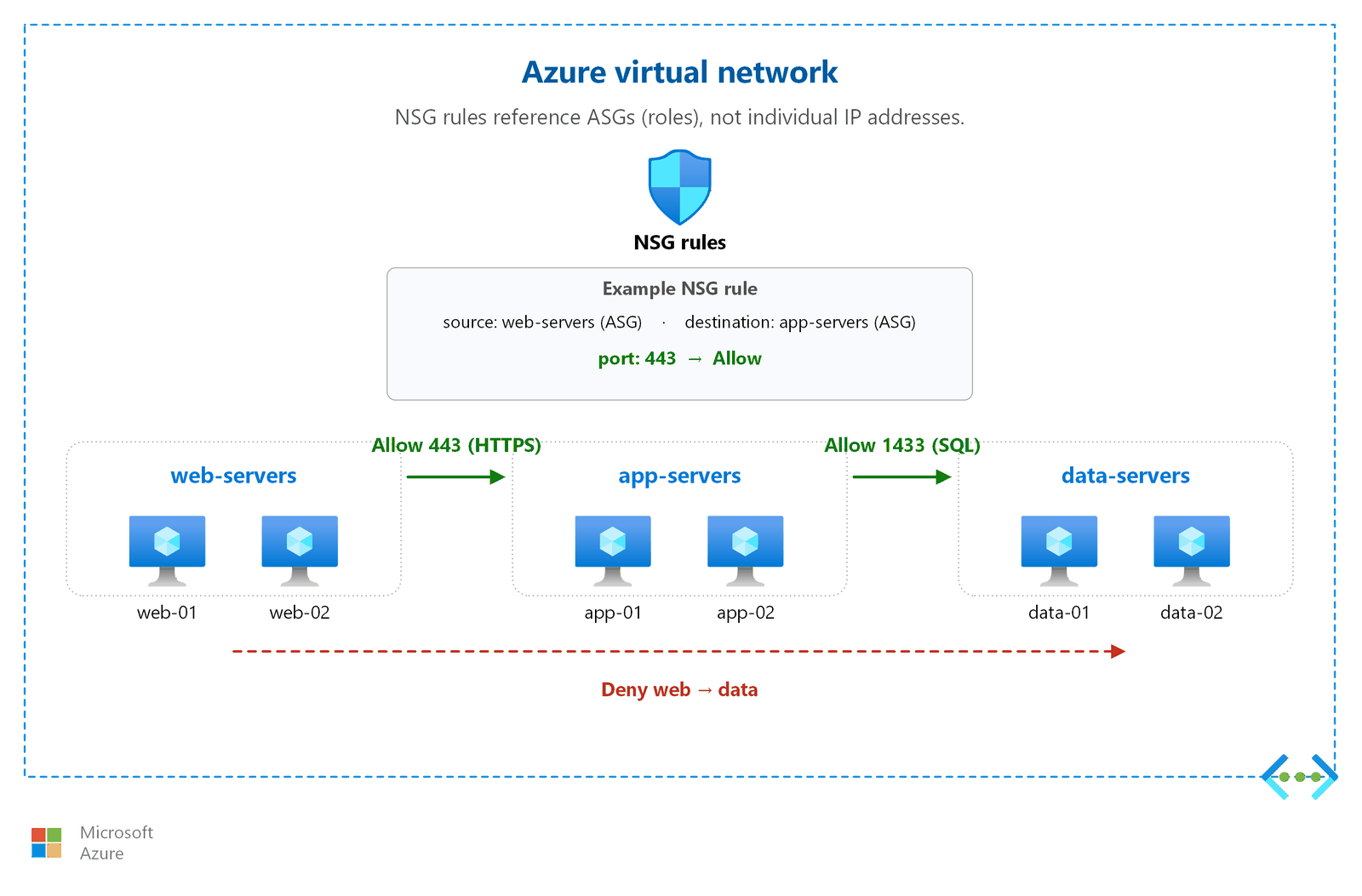
Network Security Groups (NSGs) are one of the most commonly used security controls in Microsoft Azure networking. They allow you to control network traffic to and from Azure resources using rules based on source, destination, port, protocol and direction.
NSGs are relatively simple to configure, but troubleshooting them can become confusing when rules are associated with both subnets and network interfaces.
In this guide, we will explain how Azure NSGs actually work, how rule priorities are evaluated, how inbound and outbound traffic is handled, and how to troubleshoot common NSG problems.
What Is an Azure Network Security Group?
A Network Security Group is a collection of security rules that can allow or deny network traffic to and from Azure resources.
An NSG can be associated with:
- A subnet.
- A network interface (NIC).
The rules can control traffic based on:
- Source.
- Source port.
- Destination.
- Destination port.
- Protocol.
- Direction.
- Priority.
- Allow or deny action.
Basic NSG Architecture
                    Internet
                       |
                       v
                +-------------+
                |     NSG     |
                |   Rules     |
                +-------------+
                       |
                       v
                    Subnet
                       |
                       v
                Network Interface
                       |
                       v
                  Azure VM
Depending on where the NSG is associated, traffic can be filtered at the subnet level, the network interface level, or both.
Why Are NSGs Important?
Without appropriate network filtering, services running on a VM may become reachable from networks where they should not be accessible.
For example, suppose a Linux VM is running an SSH service on TCP port 22.
Internet
   |
   | TCP 22
   v
Azure VM
   |
   v
SSH
An NSG can restrict that traffic so that SSH is allowed only from a trusted source network.
Inbound vs Outbound Rules
NSG rules have a direction.
Inbound
Inbound rules control traffic coming toward the resource.
Internet
   |
   v
Inbound NSG Rules
   |
   v
Azure VM
Outbound
Outbound rules control traffic leaving the resource.
Azure VM
   |
   v
Outbound NSG Rules
   |
   v
Internet / Other Network
How NSG Rules Are Structured
An NSG rule contains several important properties.
| Property | Purpose |
|---|---|
| Name | Identifies the rule |
| Priority | Determines evaluation order |
| Source | Where traffic originates |
| Source Port | Originating port |
| Destination | Traffic destination |
| Destination Port | Target port |
| Protocol | TCP, UDP, ICMP or Any |
| Direction | Inbound or outbound |
| Action | Allow or deny |
Understanding NSG Priority
Priority is one of the most important concepts when working with NSGs.
NSG rules are evaluated in priority order. A lower numerical priority is evaluated before a higher numerical priority.
For example:
Priority 100
Allow TCP 443

Priority 200
Deny TCP 443
If traffic matches the first rule, the later rule does not override that decision.
This is why simply adding an allow or deny rule is not enough. You must also check its priority and whether another rule matches the same traffic first.
Example: Allow HTTPS
Suppose your web server needs to receive HTTPS traffic.
Source: Any
Destination: Web VM
Protocol: TCP
Destination Port: 443
Action: Allow
A rule can allow HTTPS traffic while other ports remain blocked according to the applicable NSG rules.
Example: Restrict SSH
Instead of allowing SSH from every internet address, restrict the source to a trusted IP range where practical.
Source: Trusted Admin Network
Destination: Linux VM
Protocol: TCP
Destination Port: 22
Action: Allow
This reduces unnecessary exposure of the management service.
NSG and Subnet Association
An NSG can be associated with a subnet.
Virtual Network
      |
      +---- Web Subnet
      |       |
      |      NSG
      |       |
      |      VM
      |
      +---- App Subnet
              |
             NSG
              |
             VM
This is useful when you want common network rules to apply to resources within a subnet.
NSG and NIC Association
An NSG can also be associated directly with a network interface.
Subnet
  |
  v
Network Interface
  |
  +---- NSG
  |
  v
VM
NIC-level rules can be useful when a particular VM requires additional restrictions beyond the common subnet-level policy.
Subnet NSG vs NIC NSG
One of the most important troubleshooting concepts is understanding that a VM can be affected by NSGs at both the subnet and NIC levels.
                 VM
                  |
            Network Interface
                  |
               NSG - NIC
                  |
                Subnet
                  |
             NSG - Subnet
When traffic is unexpectedly blocked, inspect both associations rather than checking only the subnet or only the NIC.
Inbound Traffic Flow
For inbound traffic destined for a VM, Azure evaluates the applicable network security rules along the network path.
Client
  |
  v
Subnet NSG
  |
  v
NIC NSG
  |
  v
VM
If an applicable rule denies the traffic, the connection will not reach the application.
Outbound Traffic Flow
Outbound traffic is also evaluated against the applicable security rules.
VM
 |
 v
NIC / Subnet Security Rules
 |
 v
Azure Network
 |
 v
Destination
This matters when a VM can receive traffic but cannot connect to an external service.
Default NSG Rules
Azure NSGs include default security rules. These provide baseline behavior for common Azure networking scenarios.
User-defined rules are evaluated before the default rules because they use higher precedence through their priority values.
You should understand the default rules rather than assuming that every connection requires an explicit rule.
Service Tags
Azure service tags provide predefined groups of IP address prefixes representing specific Azure services or categories of traffic.
They can simplify NSG rules when you need to allow traffic from supported Azure services.
NSG Rule
   |
   +---- Source = Azure Service Tag
   |
   v
Destination VM
Service tags are preferable to manually maintaining large lists of Azure IP addresses when the relevant service supports the required tag.
Application Security Groups
Application Security Groups, or ASGs, allow you to group virtual machines logically and use those groups in network security rules.
                NSG
                 |
        +--------+--------+
        |                 |
     Web ASG           App ASG
        |                 |
     VM1 VM2           VM3 VM4
This can make security rules easier to manage when an application contains multiple tiers.
Three-Tier Application Example
                 Internet
                    |
                    v
              Web Subnet
                 NSG
                    |
                  Web
                  VMs
                    |
                    v
              App Subnet
                 NSG
                    |
                App VMs
                    |
                    v
               DB Subnet
                 NSG
                    |
                Database
A common design is to allow only the required traffic between application tiers.
For example:
- Internet to web tier: HTTPS.
- Web tier to application tier: application-specific port.
- Application tier to database tier: database-specific port.
- Database tier: no unnecessary direct internet access.
Why Rule Priority Causes So Many Problems
Consider these rules:
Priority 100
Deny TCP 443

Priority 200
Allow TCP 443
Adding the second rule does not make HTTPS work because the earlier matching rule already denies the traffic.
The correct troubleshooting question is:
Which rule matches this traffic first?
Common NSG Mistake: Allow Rule Added at the Wrong Priority
An administrator may add an allow rule but assign it a priority lower in precedence than an existing deny rule.
Always review:
- Source.
- Destination.
- Protocol.
- Port.
- Direction.
- Priority.
- NSG association.
Common NSG Mistake: Wrong Port
An application may be listening on port 8080 while the NSG allows port 80.
NSG:
Allow TCP 80

Application:
Listening on TCP 8080
The NSG can be working exactly as configured while the application remains unreachable.
Always confirm the actual listening port on the VM.
sudo ss -lntpCommon NSG Mistake: Operating System Firewall
An NSG is not the only firewall layer.
Internet
   |
   v
Azure NSG
   |
   v
VM
   |
   v
OS Firewall
   |
   v
Application
A connection can be allowed by the NSG but blocked by the Linux firewall, Windows Firewall or the application itself.
NSG Does Not Replace Application Security
NSGs operate at the network security layer. They should not be treated as a replacement for application authentication, authorization, encryption or secure application configuration.
A production architecture typically uses multiple layers of security.
Identity
   +
Application Security
   +
Network Security
   +
Host Security
   +
Data Security
How to Troubleshoot an NSG Problem
When a connection fails, follow a structured process.
- Identify the source IP.
- Identify the destination IP.
- Identify the destination port.
- Identify the protocol.
- Determine whether the traffic is inbound or outbound.
- Identify the destination NIC and subnet.
- Check the NSG associated with the subnet.
- Check the NSG associated with the NIC.
- Review rule priorities.
- Check the operating system firewall.
- Verify that the application is listening on the expected port.
Use Azure Network Watcher for Troubleshooting
Azure Network Watcher provides several tools that can help diagnose network connectivity.
One particularly useful capability is IP flow verification.
Source IP
    |
    v
Destination IP
    |
    v
Destination Port
    |
    v
Protocol
    |
    v
NSG Evaluation
    |
    v
Allow / Deny
This can help identify whether an NSG rule is responsible for a blocked flow.
Testing an NSG Rule
Suppose a web application should accept HTTPS connections.
Source: Internet
Destination: Web VM
Protocol: TCP
Port: 443
Expected: Allow
Test the connection from a suitable client:
curl -I https://example.comIf it fails, work through the network path rather than immediately modifying the NSG.
NSG Troubleshooting Decision Tree
Connection Failed
       |
       v
Is VM Running?
       |
       +---- No ---> Check VM State
       |
       +---- Yes
              |
              v
        Is Port Listening?
              |
              +---- No ---> Fix Application
              |
              +---- Yes
                     |
                     v
                Check NSG
                     |
              +------+------+
              |             |
            Allow          Deny
              |             |
              v             v
        Check OS FW     Check Priority
              |             |
              v             v
          Application    Correct Rule
NSG Logging and Monitoring
For environments where network visibility is important, configure appropriate NSG monitoring and diagnostic logging according to your operational requirements.
Centralized logging can make it easier to investigate repeated connection failures and security events.
Secure NSG Design Principles
- Allow only required ports.
- Restrict source networks whenever practical.
- Avoid unnecessary public exposure.
- Use application-specific rules.
- Use service tags where appropriate.
- Use Application Security Groups for logical application tiers.
- Document important custom rules.
- Review unused rules regularly.
- Keep management access restricted.
- Monitor important network activity.
Example: Secure Web Application Architecture
                         Internet
                            |
                            v
                     Application Gateway
                            |
                       Web Subnet
                            |
                      Web NSG
                            |
                       Web VMs
                            |
                            v
                       App Subnet
                            |
                       App NSG
                            |
                       App VMs
                            |
                            v
                        DB Subnet
                            |
                        DB NSG
                            |
                         Database
The exact architecture depends on the application, but the principle remains the same: allow only the communication paths required by each application tier.
Example Rule Strategy
| Traffic | Example Action |
|---|---|
| Internet → Web | Allow HTTPS where required |
| Internet → Database | Deny / do not expose directly |
| Web → App | Allow required application port |
| App → Database | Allow required database port |
| Admin → Management | Restrict to trusted management sources |
NSG vs Azure Firewall
NSGs and Azure Firewall serve different purposes and should not be treated as interchangeable components.
An NSG provides network traffic filtering at supported subnet and NIC scopes, while Azure Firewall is a managed, centralized network security service with broader traffic inspection and policy capabilities.
A larger Azure environment may use both.
Internet
   |
   v
Azure Firewall
   |
   v
VNet
   |
   +---- NSG
   |
   v
Application
NSG vs Route Table
A common troubleshooting mistake is confusing security rules with routing.
An NSG answers a security question:
"Is this traffic allowed?"
Routing answers a different question:
"Where should this traffic go?"
A correct NSG rule cannot fix an incorrect route.
NSG vs Azure Load Balancer
A load balancer distributes traffic between backend resources, while an NSG controls whether network traffic is permitted.
Client
  |
  v
Load Balancer
  |
  v
NSG / Network
  |
  v
Backend VM
When troubleshooting an application behind a load balancer, inspect both the load-balancing configuration and the applicable network security rules.
Common NSG Mistakes
- Allowing unnecessary ports from the entire internet.
- Forgetting that NSGs can exist at both subnet and NIC levels.
- Ignoring rule priority.
- Allowing the wrong destination port.
- Forgetting outbound rules.
- Ignoring the operating system firewall.
- Confusing routing problems with NSG problems.
- Using broad source ranges when narrower ranges are possible.
- Leaving obsolete rules indefinitely.
- Making emergency changes without documenting them.
Production NSG Checklist
- Review all inbound rules.
- Review all outbound rules.
- Check rule priorities.
- Check subnet-level NSG associations.
- Check NIC-level NSG associations.
- Restrict administrative access.
- Allow only required application ports.
- Use service tags where appropriate.
- Use Application Security Groups for complex application tiers.
- Monitor important network activity.
- Remove obsolete rules.
- Document security exceptions.
- Test connectivity after major network changes.
Quick NSG Troubleshooting Commands
On a Linux VM, these commands can help verify the local side of a connectivity problem:
# Show listening ports
sudo ss -lntp

# Show routing table
ip route

# Test DNS
nslookup example.com

# Test HTTPS
curl -I https://example.com

# Test a TCP port
nc -vz hostname 443
These commands do not replace Azure-side network diagnostics. They help determine whether the issue exists inside the guest operating system or somewhere in the Azure network path.
Final Thoughts
Azure Network Security Groups are a fundamental part of Azure network security, but their behavior becomes much easier to understand when you think in terms of traffic direction, rule priority, subnet association, NIC association and the complete network path.
When a connection fails, do not immediately add another allow rule. First identify the source, destination, protocol and port, then determine which NSG rules apply and which rule is making the final decision.
A strong NSG design follows the principle of allowing only the traffic that an application actually requires while keeping management and sensitive services appropriately restricted.